Sprite Editor
- Primary category
- Creative Tools
- Supporting categories
- Desktop Software
- Graphics
- State & Persistence
Overview
Our four-person team built a C++/Qt desktop sprite editor for drawing pixel art, managing frames, previewing animation, and saving or loading projects.
My Role & Contribution
I implemented the component that handled pixel data, along with preview-image functionality and animated playback. The surrounding application was a shared four-person team project.
Technical Approach / Technologies
The application separated frame data, editing behavior, canvas interaction, preview playback, and the Qt view layer. Frames were converted into images for display, serialized through Qt JSON support, and played through a timer-driven preview.
Technologies
- C++17
- Qt Widgets
- Qt images
- Qt JSON
- signals and slots
- timer-driven animation
Engineering Decisions / Trade-offs
The code separates frame state from the canvas and preview, so the same pixel data is used across editing, persistence, and playback. Qt JSON serialization stores and reloads project frames as structured state.
Challenges / Lessons
The project required pixel edits, frame selection, saved state, and animation timing to stay consistent across multiple UI components.
Results / Status
The source and recording show a working desktop editor with drawing, frame animation, preview, clear confirmation, save, and load flows.
Evidence
The case study is supported by the pinned source repository, shared source headers, the workflow recording, and curated editor frames.
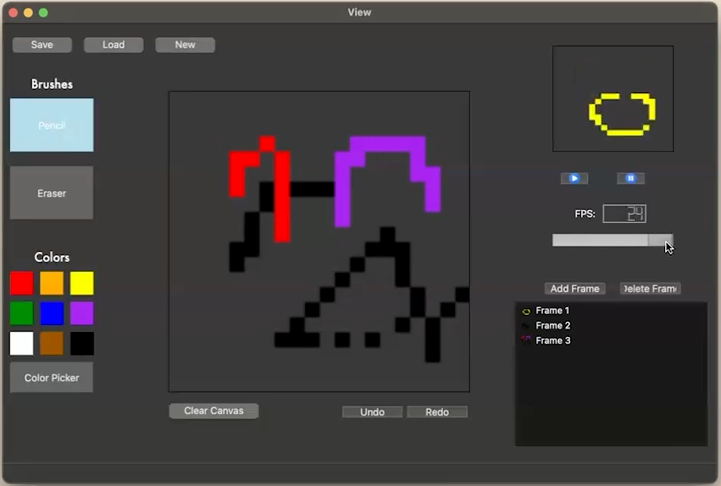
Still captured by Alan from the four-person team's Sprite Editor demonstration. The visible artwork was created by the team. Alan's contribution covered pixel-data handling, preview-image functionality and animated playback; the still alone does not demonstrate animation.
View full-size screenshot